Server Groups
Depending on the solution you intend to build, it may be necessary for certain VMs to be deployed on the same or different hosts.
For example, if you want to build a cluster with VMs, it is crucial for high availability that the VMs are not all located on the same physical host. If this host fails, all VMs in the cluster would be affected! To control this, you can deploy Instances (VMs) using OpenStack Server Groups with an Affinity or Anti-Affinity policy.
Important
A VM can only be assigned to a Server Group during deployment! This means that the Server Group must be created BEFORE deploying the VMs and selected when deploying the VM!
-
Affinity means that all Instances in the group are installed on the same physical host.
-
Anti-Affinity means that all Instances in the group are installed on a different physical host.
Note
Please use the Soft Affinity and Soft Anti Affinity Policy, as this option allows for temporary migration and starting of a failed VM on the same host in case of a disruption or maintenance, should no other free host be available at that time.
Create a Server Group
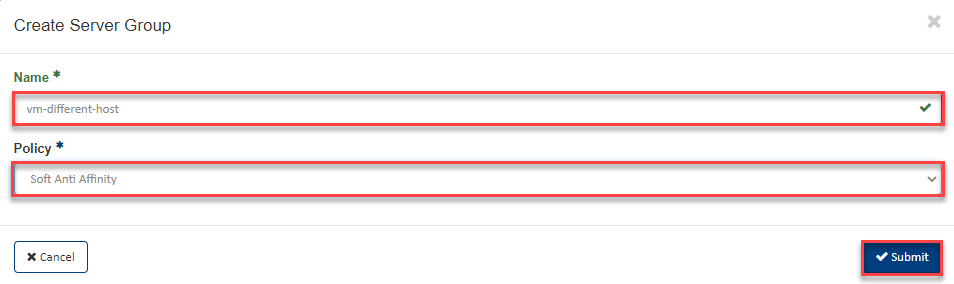
To create a Soft Anti Affinity Group, switch to Compute => Server Groups in the navigation and click on +Create Server Group.
-
Now enter a descriptive "Name" for the Server Group.
-
Then select the corresponding policy, for example Soft Anti Affinity.
-
Then click Submit.
You can now select this Server Group during VM deployment in the "Launch Instance Wizard" in the Server Groups section (see Launch Instance).